
Better Modeling with Meta/Pep/P.N – Tutorial 1: Introduction

Status
Not open for further replies.
skupilkinson - that's an awsome model, i don't think jay minds about the mini hijack - hope he gets his system sorted out soon because people are turning blue with antisipation.

eric_son - so have you got the boolean tool or not? I have it if you need it, not sure which version it'll work on (changes in sdk). You can have multiple versions of metasequoia on your system, and run them all at same time!!!
 
just like to thank jay for this tutorial ive been able to get the main body of the pod done thanks alot
 
You might also find the tutorials over at

ericks models useful.

These deal mainly with Homeworld models and include tutorials - and step by step guides - on how to extract a 3D game mesh and textures, processing the mesh through metasequoia to produce modular components, unfolding in pepa and then cleaning up the resultant "unfold" to make it easier to build.
 
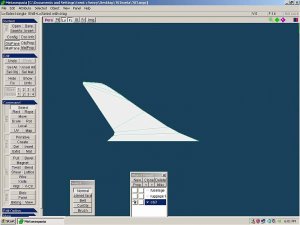
extrude?

i have created this polygon. normally i would use extrude to make the width i whant. but extrude in meta seems to work completely different. can someone explain it to me please?

vv.jpg
 
Use the extrude from the menu - not from the command panel.
The extrude shifts the faces in the direction of the normals and creates faces from the old position to the new, basically it thickens it but you loose the original face positions. Ie a square extruded creates a cube with a missing bottom.
2 ways of creating a thick wing.
1) clone the object, select and extrude the clone, invert the original object, merge 2 objects, join closed vertices.
2) select the faces, copy, extrude, paste, join closed vertices.
Easy as pie. :)

Quick note - sometimes the extrude function malfunctions and extrudes in a direction it isn't supposed to, save your work and restart metasequoia.
 
My thanks to everyone in this thread who have given me a push in the right direction with meta.It has been a big struggle making the changeover from Lightwave. I look forward to more of Jay's tut when he finishes his discertation. hopefully we will get this all into PDF format.

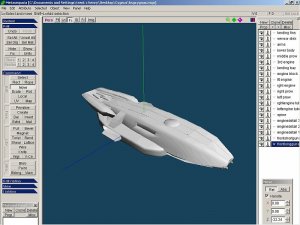
This is my first model soley in meta!
Image1.jpg
 
The Cynus? Very nice work buddy! It's very satisfying when you pull off your first model in a new software eh? ;)
 
Nice looking model. Textures next?

Cheers JTF
thank you. yes. i am waiting for some hi rez orths from the original designer.

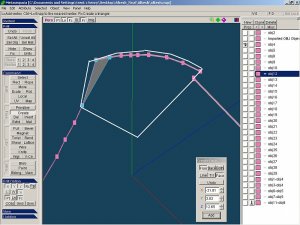
ok. in this picture i want to make a polygon in the white out lined area.you can see where i have created a triangle face in the corner.but it will not stick. anything i do will cancel the face. what am i doing wrong? i would like to know how to do this in meta as it is aggrevating bouncing this mesh between 2 programs. i succesfully created 2 faces earlier but cant figure what im doing differently here.
Image1.jpg
 
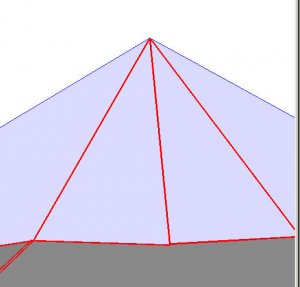
this time i have a pep question. when i port a mesh to pep how do i fix the single edges that show up in the middle of the face? I hope that was clear enough. in the picture i want the triangle to be 1 peice. but it is coming out as 4.
Image1.jpg
 
that worked on most of em. there was one that didnt do. the other thing i found i need to do is find the errant vertices and close them. thanks skip that was big help!!!!
 
hi, sorry i'm extremely busy right now and haven't been able to find time to update... i may be able to take a break soon and see what i can do to add to the tutorial...

nothing, the "disappearing" faces might be because they are being added to a different object that is turned "off", so once the face is completed it also turns "off". on the Objects Panel, make sure that the highlight is on the visible object to which you want to add the face you are making. i can see from your screencap that the highlight is on an invisible object.

that also means that any faces you drew several times before and got "cancelled" may have actually attached to/hung around that other object; in that case you need to erase them or else they will show up in pepakura as mysterious red lines indicating broken faces that don't show up when you look at the meta model. you can delete them face by face, or you can use the "delete overlapping faces" command.

on your unfolding issue, "Join adjacent edges" works only if the edges/faces are part of the same Object. Pepa won't join the edges of two separate Objects in meta. similarly in meta, points and edges of two different Objects will not join, although you can make them align perfectly so that there is no seam/gap.

skip, nice job on that Eternal!

and everyone else, you're welcome!
 
thank you. yes. i am waiting for some hi rez orths from the original designer.

ok. in this picture i want to make a polygon in the white out lined area.you can see where i have created a triangle face in the corner.but it will not stick. anything i do will cancel the face. what am i doing wrong? i would like to know how to do this in meta as it is aggrevating bouncing this mesh between 2 programs. i succesfully created 2 faces earlier but cant figure what im doing differently here.
View attachment 70091

It appears from your picture that the object you are looking at (eye) and the object selected (blue highlight) are different. I think they need to be the same.

Cheers JTF

Edit: Replied before reading Jabats reply. Oops
 
Status
Not open for further replies.